
Everything LexaKeep Can Do
Thirteen features, one sidebar and a smarter inbox. From the moment a message arrives, they all work together.
The first minute
Open a conversation in Gmail and LexaKeep reads it on the spot. A few threads in, you can see where you stand.
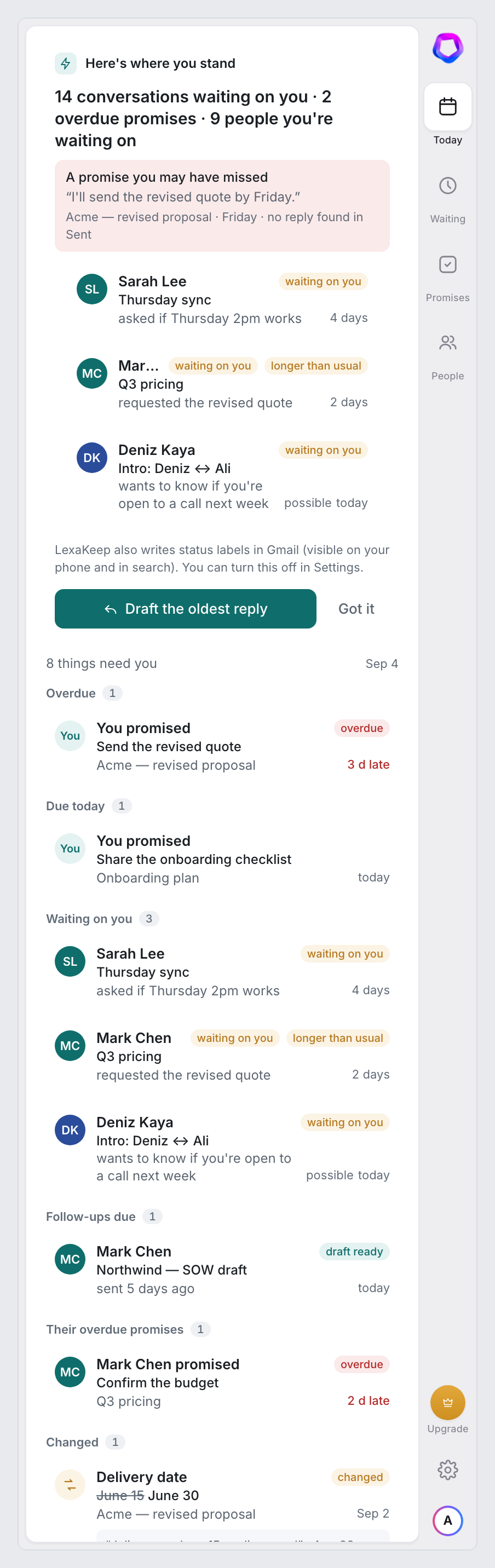
Here's where you stand
There is no import and nothing to set up. Sign in, open the conversations you're working on, and each one is read while it's on screen. The first screen isn't a tutorial; it's your situation: how many of the threads you opened are waiting on you, how many promises are overdue, how many people you're waiting on. If there's a promise you made and never followed up on, it's quoted right there with the date. One button drafts the oldest reply.
- Numbers come from your data, no estimates
- Shown once; reopen it any time from Settings
- Nothing runs while Gmail is closed
- Under a minute
Your last 30 days are scanned the moment you connect.
- Three numbers
Conversations waiting on you, overdue promises, people you're waiting on.
- A promise you may have missed
The oldest overdue promise with its quote and no reply in Sent.
- One action
Draft the oldest reply, right there.
Inside Gmail
You don't have to open the sidebar to benefit. The inbox itself starts telling you what each thread needs.
Who is waiting on you, and who you're waiting on
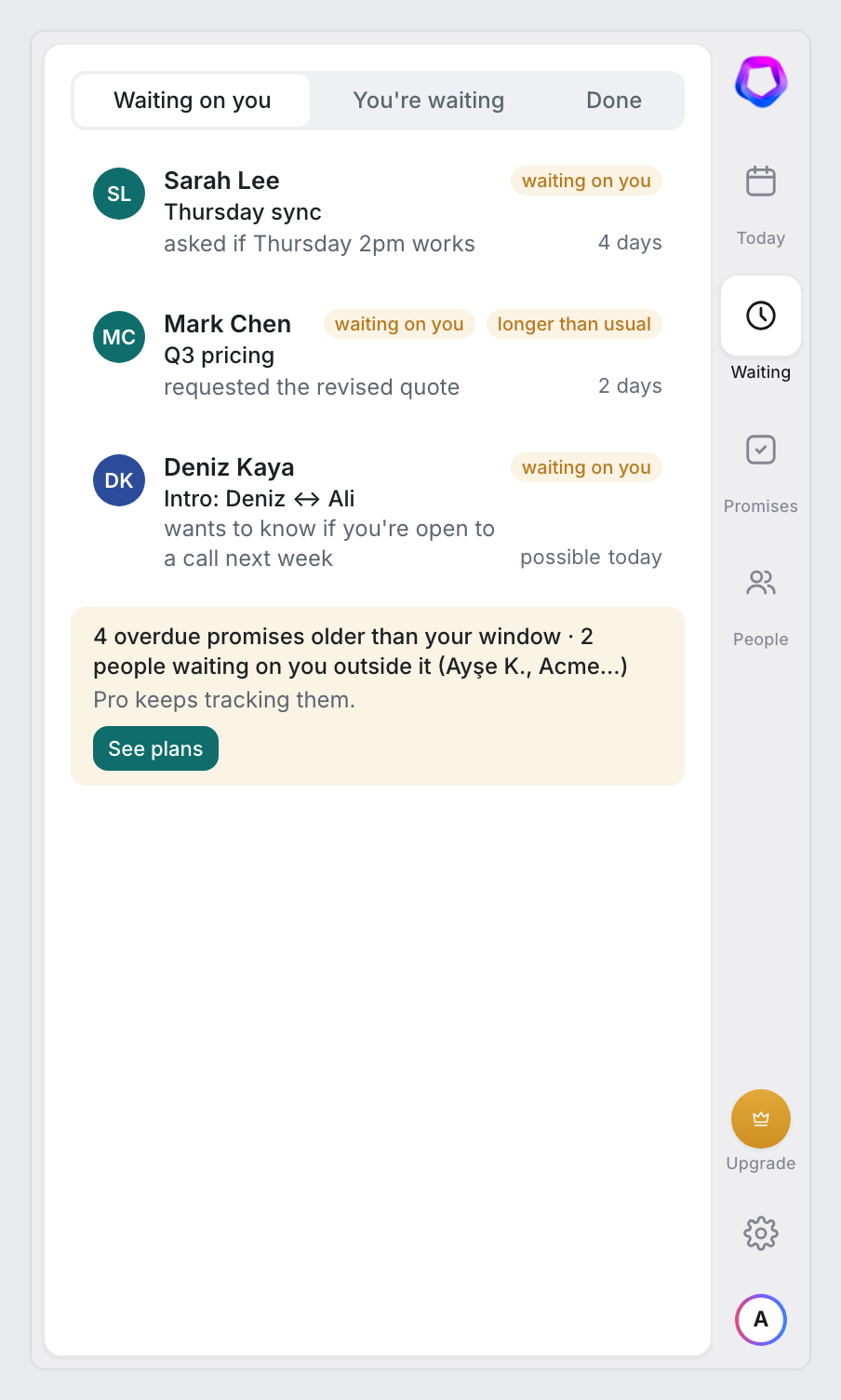
Two lists, always current. Each row shows the person, the ask in one sentence, and how long it has been open. When someone's silence runs past their usual reply time, the row says “longer than usual”. Reply with context, snooze for a day, three days or a week, or mark it as not waiting. Everything you close moves to a Done tab for two weeks with an Undo.
- Waiting on you · You're waiting · Done
- “Longer than usual” from each contact's own reply habit
- Undo restores the exact previous state
Every inbox row shows what it needs
Next to the subject, a small badge: Reply · 4d, Waiting · 2d, Promised · Fri, Overdue, Changed, Follow-up ready. Hover a row and the action is right there: draft a reply, mark not waiting, snooze. Rows you haven't opened yet get a light “may be waiting on you” hint from the sender and date alone; opening the thread replaces it with the real state. Newsletters and notifications stay out of your way.
- At most three badges per row, never a score
- Badges are drawn by the extension, nothing is written into Gmail
- Turn them off, or show the state in place of the date
- LexaKeep/Overduean overdue promise of yours
- LexaKeep/Replythey're waiting on you
- LexaKeep/Follow-upreminder fired or nudge draft ready
- LexaKeep/Promisedan open promise of yours
- LexaKeep/Waitingyou're waiting on them
- LexaKeep/FYIa real person, nothing pending
- LexaKeep/Changeda date, price or scope moved
- LexaKeep/Automatednewsletters and notifications
One status label per thread, replaced as the state changes. Remove one by hand and LexaKeep leaves that thread alone for a day.
Catch a promise before it leaves your outbox
As you write, LexaKeep notices sentences like “I'll send the contract by Thursday”. A quiet bar under the compose box names the promise and its date, and shows how many open promises you already have with that person. Track it in one click, or say it's not a promise. Sending is never blocked; if you haven't decided, it pauses once and then lets you go.
- Only your own promises; theirs are tracked from replies
- Pauses send once, never twice
- Your draft body is never stored
Thanks for the notes. I'll send the contract by Thursday with the revised pricing.
Best, Ali
Send it, and let go
Pick “Remind me” when you send: two days, three, a week, or a default for everything you send. If a reply comes first, the reminder cancels itself the next time you open the thread. If it doesn't, the thread rises to the top of your board with a polite follow-up already written. One click opens the reply box with the text in it. You read it, and decide.
- Reminders cancel on reply
- Follow-up text prepared after 3 business days of silence, adjustable or off
- One follow-up per thread; never sent for you
A polite nudge is waiting in your Drafts, attached to the same thread. Reply arrives first? The reminder cancels itself.
Catch the numbers that quietly changed
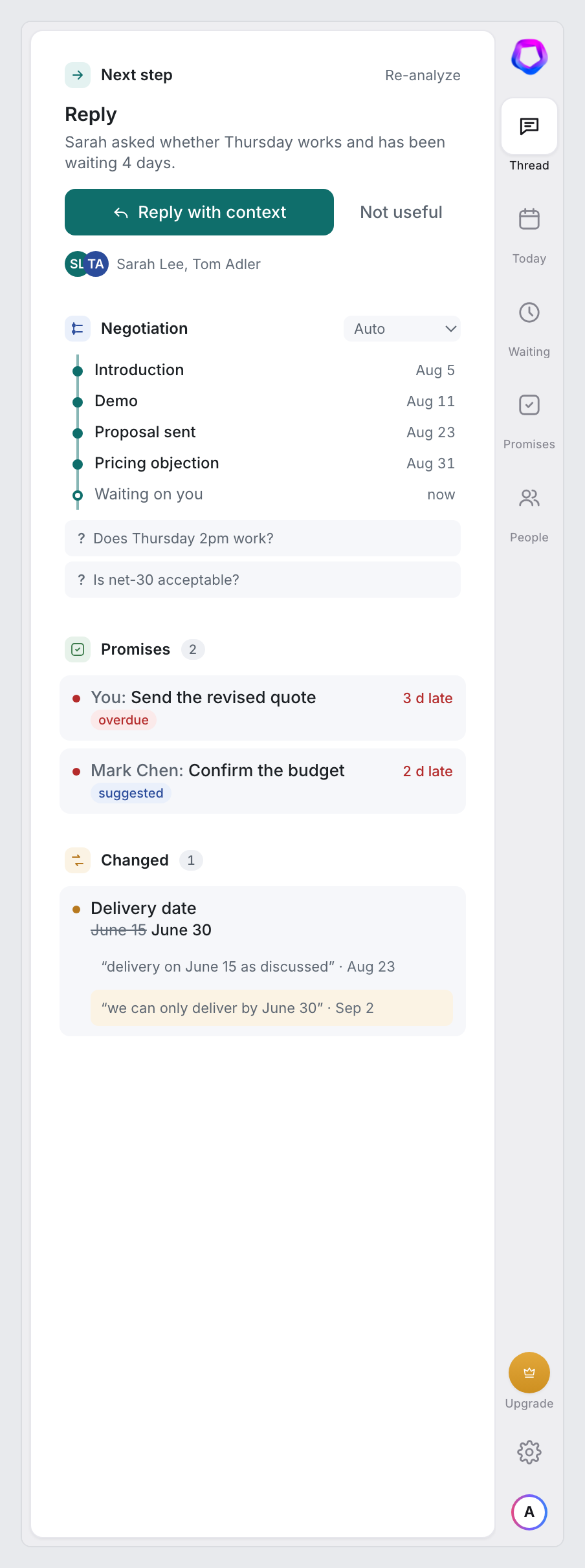
When a date, price, quantity or scope appears with a different value later in the same thread, LexaKeep shows both quotes side by side and puts a one-line notice at the top of the thread. It doesn't judge whether it's a revision or a slip; you do. Address it directly in your reply, or dismiss it and it stays dismissed.
- Earlier and later quotes, verbatim
- Chains when a value moves more than once: 12 → 15 → 20 Sep
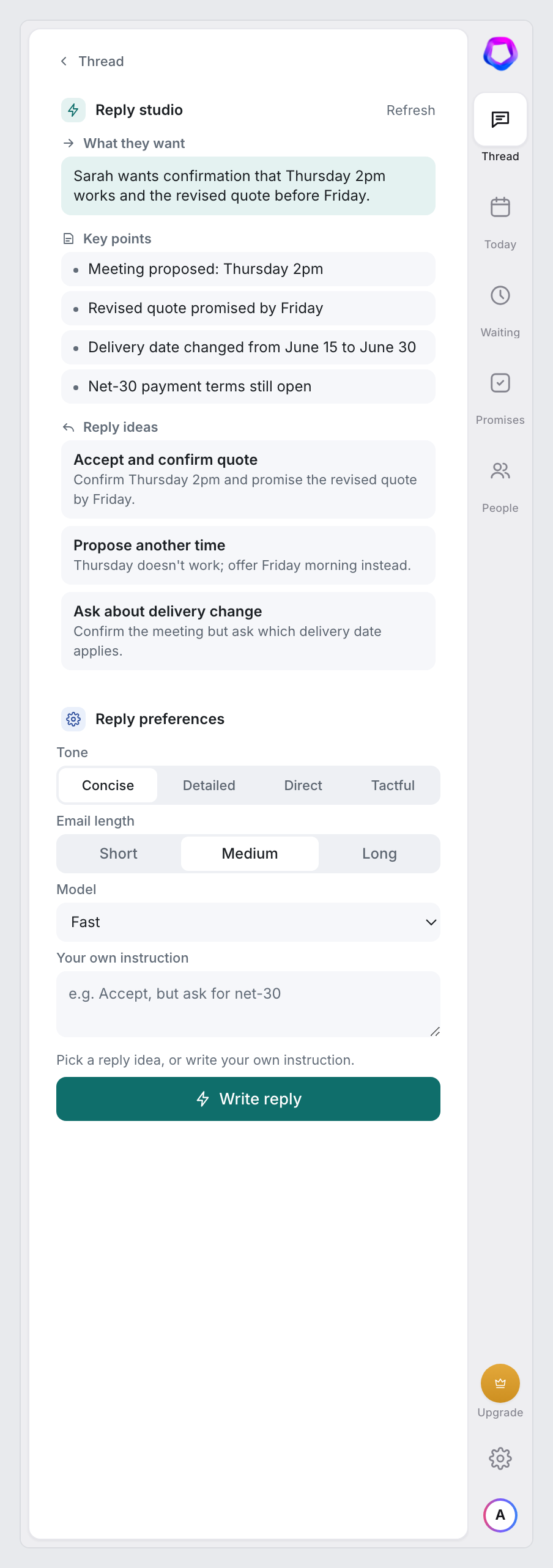
- Reply Studio can address the change for you
“…delivery on June 15 as discussed.”
“…we can only deliver by June 30.”
The sidebar
Open a thread and the panel tells you what to do, why, and how to say it.
One next step for every open thread
Reply, wait, follow up, schedule, forward or archive. One suggestion per thread with a one-line reason you can check against the thread yourself. Archive is only ever suggested when nothing is pending and no promise is open. If a suggestion is wrong, say so and it's replaced.
- Reason shown, always
- Low confidence is labelled “possible”, never a percentage
- Feedback trains the next suggestion
- One move per thread
Reply, wait, follow up, schedule, forward or archive.
- The reason, spelled out
“Sarah asked whether Thursday works and has been waiting 4 days.”
- Guarded
Archive is never suggested while something is pending.
- Not useful?
One click teaches it; the suggestion is replaced.
Every promise, tracked, yours and theirs
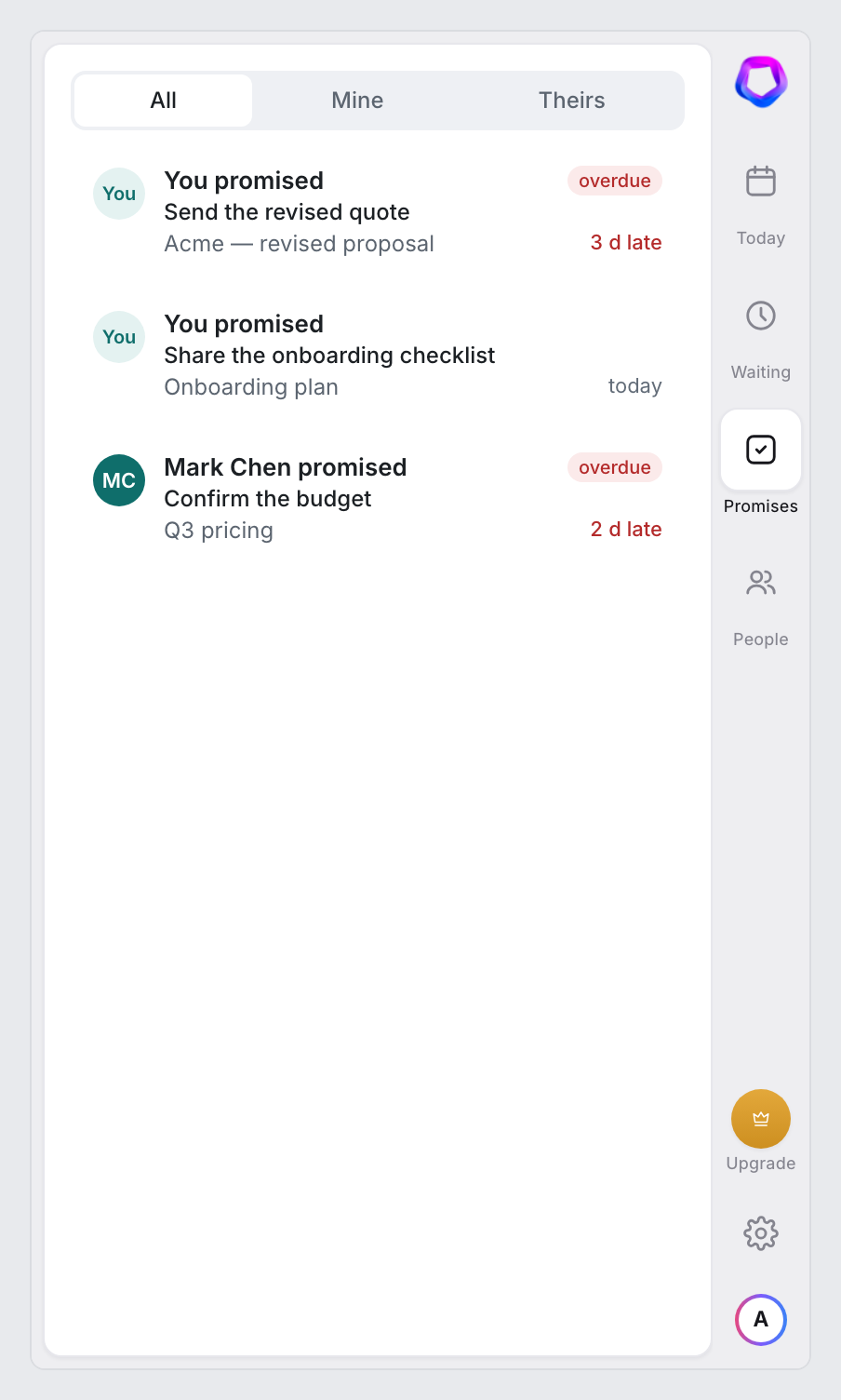
Promises made in either direction are pulled from every new message, with the due date resolved from phrases like “Friday”, “next week” or “ay sonuna kadar”, and the original sentence kept as proof. Confirm, dismiss, mark done, edit the date or set a reminder. Overdue promises stay in every brief until you close them; the day count keeps climbing.
- Works in English and Turkish
- Dates computed by a parser, not guessed by AI
- Nothing is tracked without your say
- Both directions
What you promised and what they promised, in one list.
- Due date resolved
“Friday”, “next week”, “ay sonuna kadar” become real dates.
- Proof attached
Every promise keeps the exact sentence it came from.
- You decide
Confirm, dismiss, mark done or set a reminder.
Where each conversation stands
A vertical timeline of the conversation: introduction, discussion, proposal, negotiation, agreed, delivery, closed. Milestones link straight to the message they came from, and the questions the thread still hasn't answered are listed underneath. Disagree with the stage? Set it yourself; the AI keeps its own guess aside and never overwrites yours.
- Milestones with dates and source messages
- Open questions, listed
- Your override wins
- Seven stages
Introduction, discussion, proposal, negotiation, agreed, delivery, closed.
- Milestones with dates
Each one links to the message it came from.
- Open questions
What the thread still hasn't answered.
- Your call wins
Override the stage; the AI never overwrites it.
The whole relationship on one card
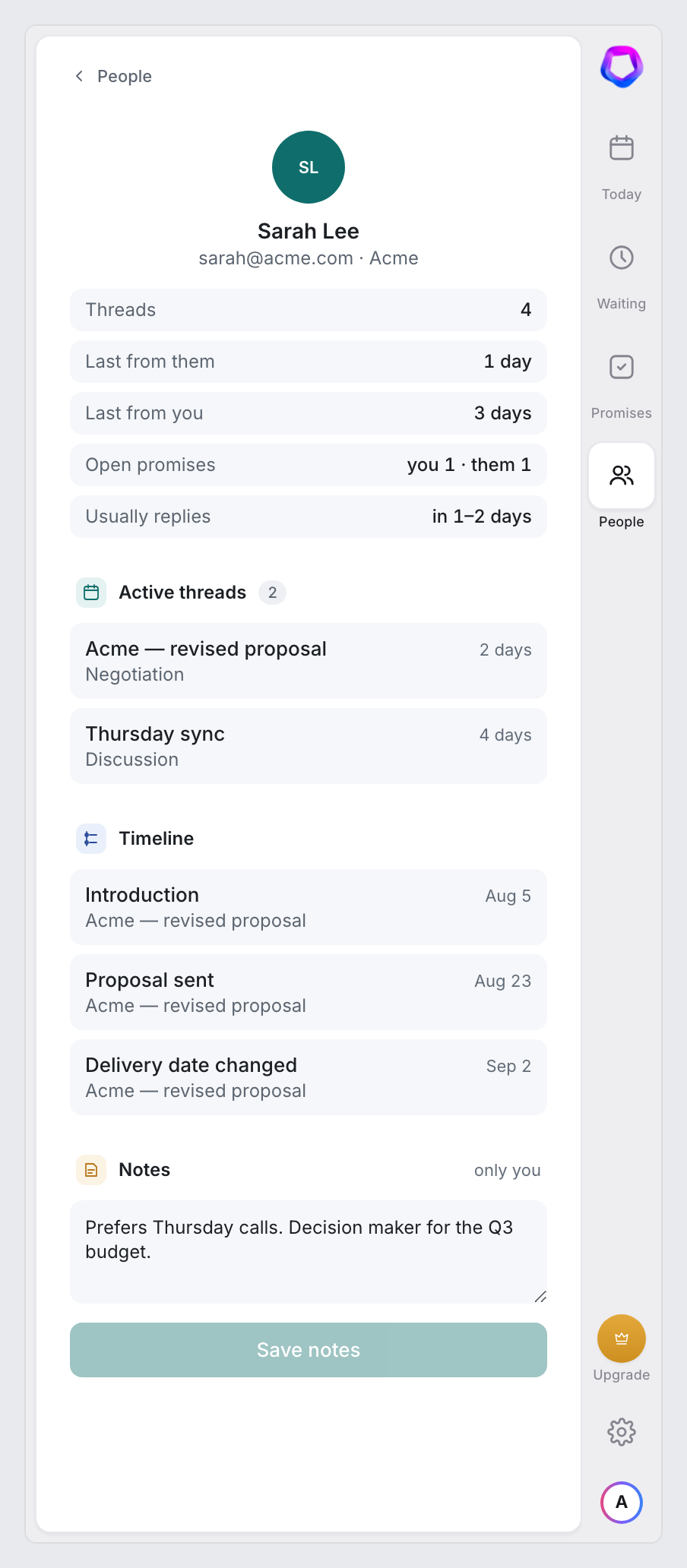
Click a name and see the last inbound and outbound, open promises on each side, active threads with their stage, and a combined timeline. A line like “usually replies in 1–2 days” comes from their own last answers, and it's what powers “longer than usual” on the board. Add your own notes; the AI never reads or edits them.
- Reply habit in plain words, no averages
- Promises both ways
- Notes are yours alone
- The whole relationship
Last inbound, last outbound, active threads and their stage.
- Usually replies in 1–2 days
A reply habit from their last answers — no percentages.
- Promises both ways
What you owe them, what they owe you.
- Your notes
Plain text the AI never reads or edits.
Your day, before your inbox
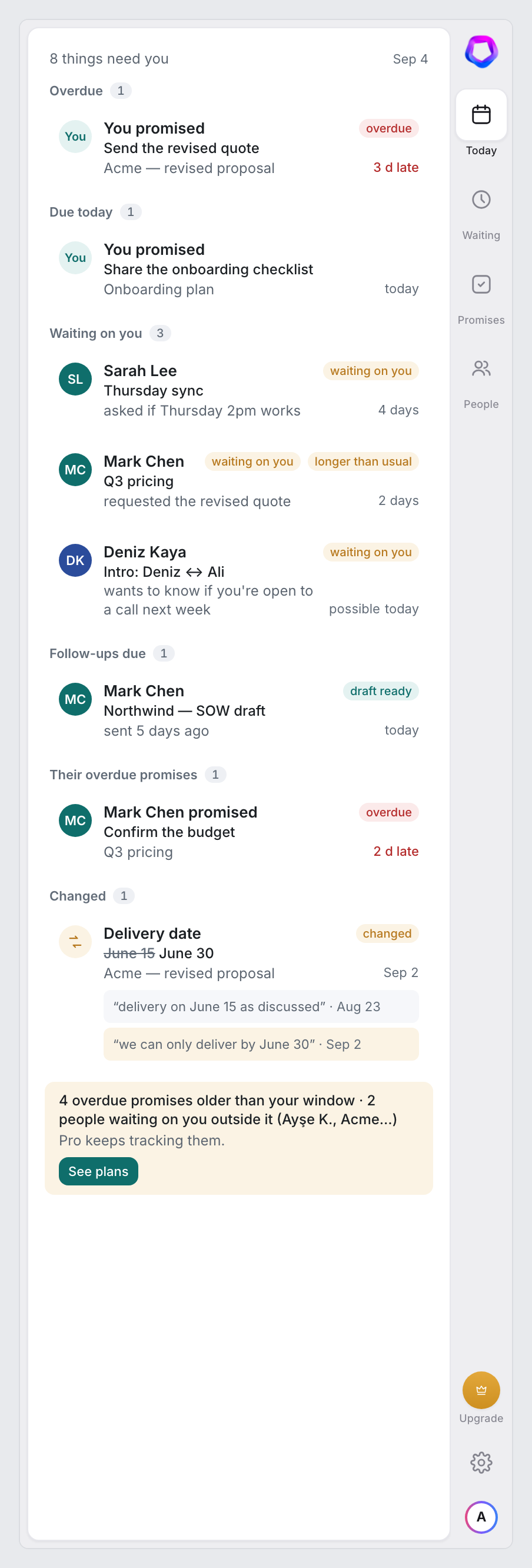
At the hour you choose: overdue promises, what's due today, the oldest threads waiting on you, follow-ups that fired, and new changes. Every line has two links: open the thread, or draft the reply and land straight in Reply Studio. Built from your data with no guesswork, in the sidebar and optionally by email. If there's nothing, it says so.
- Panel for everyone, email on Pro
- Open · Draft reply on every line
- Overdue items stay until you close them
Trust
The rules LexaKeep never breaks.
Reads what you open. Never sends, archives or deletes.
LexaKeep asks for no Gmail permission at all; Google sign-in only gives us your email address and name. The extension reads the conversation you have open on screen and sends it to our server for analysis. Raw email bodies are held for a few minutes and then deleted; what we keep is structured state and short quotes. Nothing runs while Gmail is closed. Delete all your data in one click and it's gone within 24 hours.
- No percentages, no scores; every suggestion shows its source
- No Gmail permission; nothing is written into your mailbox
- Delete everything in one click
Ready to see where every conversation stands?
Sign in with Google, open a conversation, and see what it needs. No Gmail permission, nothing to import.
Add to Chrome — Free